
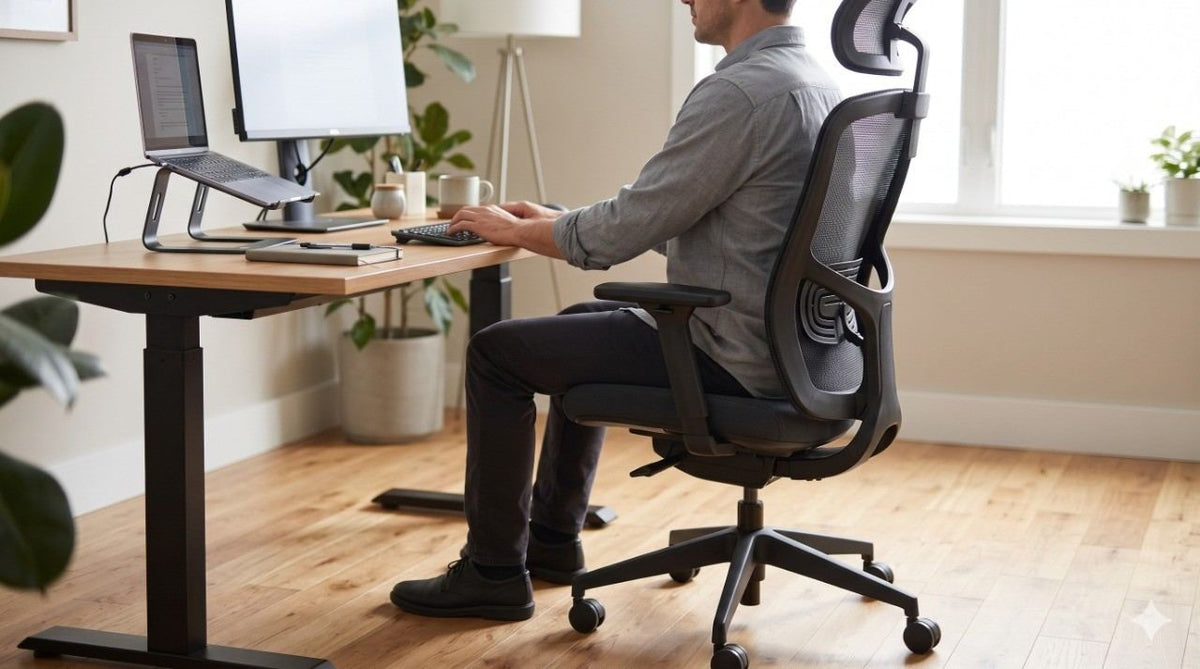

To choose an ergonomic office chair that genuinely supports your body, start with your own physical measurements rather than a marketing feature list. A properly fitted chair allows your feet to rest flat on the floor, leaves a small gap between the seat edge and the backs of your knees, and aligns the lumbar curve with your lower spine. Once you narrow down your options, always test the chair at your actual workstation for a full work session.
The word “ergonomic” appears on thousands of product listings, yet the label itself guarantees nothing about proper posture or comfort. According to data from the Centers for Disease Control and Prevention (CDC), 39.0% of U.S. adults experienced back pain within a three-month period, making chair selection a critical health and productivity decision. If you are still exploring the fundamentals of workplace ergonomics, read our foundational overview of what ergonomic furniture is before diving into this practical buying guide.
7 Essential Fit Checks for an Ergonomic Desk Chair
The Occupational Safety and Health Administration (OSHA) publishes a detailed chair purchasing checklist with standard target ranges, though they note that no single dimension fits every body type. At LeisureMod, we advise office managers and individual buyers to use these clinical benchmarks as an initial filter, then verify every adjustment against the person who will sit in the chair.
-
1. Seat Height: Look for an adjustable pneumatic range between 15 and 22 inches from the floor. Your feet should plant flat with your thighs parallel to the ground. Always check the lowest height setting first; for example, our Ingram mesh task chair bottoms out at 18.5 inches, meaning shorter individuals will need an under-desk footrest to maintain proper leg alignment.
-
2. Seat Depth and Width: Aim for a seat pan 15 to 17 inches deep with a waterfall (rounded) front edge to prevent pressure behind your knees. Avoid chairs where only the backrest tilts, as fixed seat pans cannot adapt to different femur lengths. According to the Cornell University Ergonomics Web, the seat width should also clear your hips and thighs by at least one inch on each side.
-
3. Lumbar Support: Height-adjustable lumbar support is the gold standard because lower back curves vary widely. However, Cornell notes that a fixed contoured backrest—such as the built-in lumbar support on our Brio office chair—works effectively for single-user setups if the curve aligns naturally with your spine when seated upright.
-
4. Recline and Tension Control: Choose a backrest that reclines at least 15 degrees, and add an adjustable headrest if the recline exceeds 30 degrees. Rather than locking the backrest into a rigid 90-degree angle all day, Cornell recommends using tension adjustment so the chair moves dynamically with your posture.
-
5. Armrest Positioning: Adjustable armrests should range from 7 to 10.5 inches above the seat surface and sit at least 16 inches apart so your shoulders stay relaxed. If fixed armrests force your shoulders up or block you from pulling close to your desk, OSHA recommends removing them entirely.
-
6. Base Stability and Casters: Insist on a five-star base with a 360-degree swivel and casters matched to your flooring (soft polyurethane wheels for hardwood, hard nylon for low-pile carpet). OSHA warns that four-legged swivel bases tip over far more easily when leaning or reaching.
-
7. Weight Capacity and BIFMA Standards: Standard office chairs typically support up to 275 pounds, while specific models like the Ingram are rated for 250 pounds. Check for ANSI/BIFMA X5.1 certification, which verifies structural safety and durability, though it does not measure ergonomic fit. For heavier individuals, look for chairs tested under the ANSI/BIFMA X5.11 large-occupant standard, which supports users between 275 and 400 pounds and features seats at least 22 inches wide.
Mesh, Fabric, or Leather: Best Chair Materials for Long Hours
Selecting the right upholstery directly impacts temperature regulation and cushion longevity during an eight-hour workday. OSHA recommends firm, breathable, and resilient materials for both the seat pan and backrest, while Cornell cautions that vinyl-style covers trap heat and moisture against the skin, and low-density foam flattens prematurely under daily use.
| Material Type | Breathability | Cushion & Support Feel | Best Office Application | Maintenance Needs |
| Mesh | High (maximum airflow) | Firm, responsive suspension | All-day task seating & warm offices | Low; vacuum dust from weave |
| Woven Fabric | Moderate (can retain warmth) | Soft, padded foam contour | General workstations & home offices | Moderate; requires spot cleaning |
| Leather / Vinyl | Low (traps body heat) | Plush, structured upholstery | Executive suites & conference rooms | Low; wipe clean with damp cloth |
For high-focus daily desk work, breathable mesh remains the most reliable choice. Leather and upholstered seating work best in executive offices and boardrooms where aesthetics take priority and sitting sessions are shorter. Our wholesale office chairs collection spans mesh, fabric, and leather builds across task, executive, and conference styles.
How to Test an Ergonomic Chair at Your Own Desk
Never judge an office chair by a two-minute showroom sit. Both OSHA and Cornell emphasize conducting an extended trial at your actual workstation to see if the seat still feels supportive after 60 to 120 minutes of real work.
During your test session, dial in every lever while seated to ensure the controls are easy to reach without straining. Type on your keyboard, use your mouse, and check how smoothly the chair rolls across your floor. If you are ordering online, verify the return policy and restocking terms before purchasing—and if you have chronic lower back pain, consult a physical therapist or clinician to validate your setup.
Sourcing Ergonomic Seating for a Team or Commercial Space
When outfitting an entire office, allocate your budget toward the workstations that see the longest hours and the greatest variety of body types. Shared workstations and hot desks require chairs with the widest adjustment ranges, as OSHA highlights multi-user adjustability as the top priority for shared seating. Reception areas and short-stay meeting rooms can rely on simpler, fixed-frame chairs.
Feedback from commercial buyers consistently reinforces the value of targeted ergonomics. Facility managers outfitting multi-monitor setups often note that smooth swivel mechanics—like those on our Benmar chair—reduce neck and torso twisting throughout the day, while reliable built-in lumbar support keeps staff upright during back-to-back shifts. At LeisureMod, we require no minimum order quantity, and most in-stock items ship within 1 to 3 business days from our East and West Coast warehouses.
Next Steps for Outfitting Your Workspace
Start by measuring your current desk height and leg length, screen your shortlist against the seven fit checks above, and commit to a full-session desk test before finalizing your order. If you are furnishing a corporate office or stocking a commercial reseller catalog, apply for a LeisureMod trade account to access wholesale pricing and live inventory—our team reviews applications within 24 to 48 hours.
Frequently Asked Questions
How do I know if an office chair is really ergonomic?
Verify that the seat height, seat depth, lumbar curve, armrests, and recline tension adjust to match your specific body proportions, then test the chair for a continuous 60-to-120-minute work session. The word "ergonomic" on a product tag alone does not guarantee support.
Is a mesh office chair better than leather for sitting all day?
Yes, mesh is generally better for full-day desk work because its open weave promotes airflow and prevents heat buildup. Leather and thick upholstery are better suited for executive offices and conference rooms where sessions are shorter.
Do I need armrests on an ergonomic desk chair?
Armrests are helpful only when they adjust to match your natural elbow height and shoulder width without forcing you to hunch or sit far from your desk. If fixed armrests interfere with your posture, OSHA advises removing them.
How long should I test an ergonomic chair before buying?
Test the chair for at least one full work session—ideally two hours or more—while typing and using your mouse at your actual desk. A brief five-minute sit will not reveal pressure points or lumbar misalignment.
What weight capacity should I look for in an office chair?
Choose a chair rated comfortably above your body weight. Standard commercial chairs certified under ANSI/BIFMA X5.1 support up to 275 pounds, while heavier users should look for large-occupant chairs tested to the ANSI/BIFMA X5.11 standard (275 to 400 pounds).