

Ergonomic furniture refers to chairs, desks, monitor mounts, and accessories engineered to support the human body's natural alignment, minimize physical strain, and maximize daily working efficiency. Rooted in the science of ergonomics—the study of how people interact with their working environments—these furnishings adapt directly to individual anatomy rather than forcing the user to conform to static, rigid angles.
Why Workspace Ergonomics Matters: The Biomechanical Impact
Sedentary office work places substantial mechanical stress on the musculoskeletal system. Prolonged static sitting flattens the natural lumbar lordosis (the inward curve of the lower back), increases intradiscal pressure, and forces the cervical spine into a forward-head tilt. Over time, these posture deficits contribute to musculoskeletal disorders (MSDs), including carpal tunnel syndrome, tension neck syndrome, and chronic lower back strain.
Standard office furniture assumes an "average" user profile that fits virtually no one properly. Ergonomic furniture solves this through precise adjustability, maintaining a neutral body posture where joints naturally align, muscle tension is minimized, and circulation remains unobstructed throughout the working day.
Core Characteristics of Ergonomic Office Furniture
High-performance ergonomic furnishings share several non-negotiable engineering standards designed to fit diverse body types and varied tasks:
-
Dynamic Adjustability: Multi-point adjustment mechanisms—including pneumatic seat height, lumbar depth and tension, 3D/4D armrests, and synchro-tilt recline—allow fine-tuned adaptation to individual limb lengths and torso heights.
-
Biomechanical Lumbar Support: Dynamic lower back support conforms to the spine’s natural "S-curve," offloading body weight from spinal discs onto the chair's backrest.
-
Pressure-Relief Contouring: Waterfall seat edges taper downward at the front of the cushion to eliminate pressure behind the knees, preventing venous pooling and keeping lower-extremity circulation active.
-
Thermal Regulation and Breathability: Premium mesh and breathable elastomeric textiles disperse heat and regulate core body microclimates over continuous 8-to-10-hour work sessions.
-
Facilitation of Active Movement: Synchronous-tilt mechanisms, rocking features, and motorized sit-stand desks encourage micro-movements, reducing static muscular fatigue.
Ergonomic Furniture vs. Traditional Office Furniture
The distinction between true posture-correcting solutions and standard commercial furniture centers on kinetic adaptability and load distribution:
| Feature / Metric | Ergonomic Workspace Furniture | Traditional Commercial Furniture |
| Lumbar Support | Dynamic, depth- and height-adjustable support along the L1–L5 lumbar vertebrae | Flat, rigid backboards or fixed, uncalibrated foam padding |
| Seat Pan Design | Adjustable depth, contoured cushion, and waterfall front edge | Fixed depth, flat profile, often restricts popliteal circulation |
| Armrest Articulation | 3D/4D motion (height, width, depth, pivot) to maintain a 90° elbow angle | Fixed plastic or metallic loops; cannot be aligned to desk surface |
| Height Flexibility | Pneumatic gas lift (chairs) / motorized dual-motor columns (desks) | Standard fixed desk height (28"–30") and limited chair adjustability |
| Movement Support | Dynamic tilt recline with variable resistance; promotes active sitting | Rigid upright 90° lock or uncontrolled loose tilt |
| Long-Term Musculoskeletal Impact | Drastically lowers risks of repetitive strain injuries (RSI) and disc compression | Increases risk of chronic neck strain, sciatica, and thoracic fatigue |
| Typical Warranty & Certification | 5 to 12 years; certified to ANSI/BIFMA X5.1 / ISO 9241-5 standards | 1 to 3 years; basic structural stability only |
Essential Components of an Ergonomic Workstation
Building a balanced, strain-free setup requires coordinating multiple workstation elements:
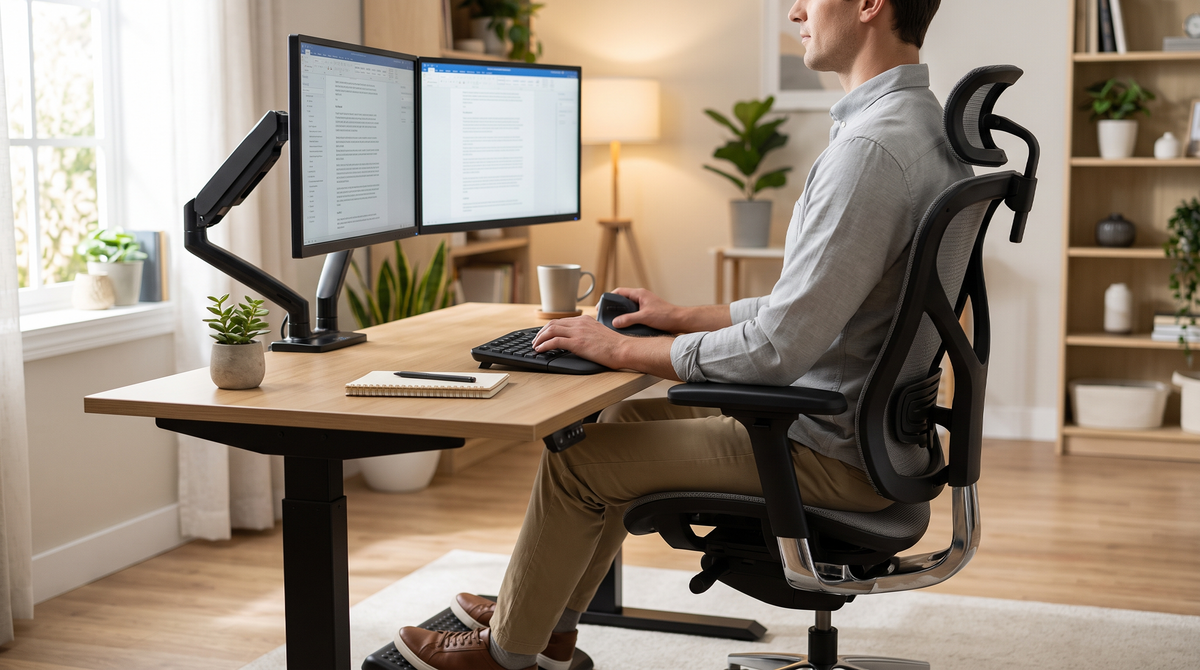
1. Ergonomic Task Chairs
The core of any sedentary setup. High-end task chairs feature:
-
Synchronous Recline: The backrest reclines at a 2:1 ratio relative to the seat pan, keeping feet planted while opening the torso angle to relieve spinal disc pressure.
-
Seat Slider Mechanism: Adjusts seat depth so users maintain 2 to 3 fingers of clearance between the back of the knee and the front edge of the seat.
-
Adjustable Armrests: Prevent trapezius and shoulder strain by bearing forearm weight parallel to desk height.
2. Height-Adjustable Sit-to-Stand Desks
Alternating between sitting and standing counteracts metabolic deceleration and relieves prolonged sacral load.
-
Dual-motor electronic lifting columns provide smooth, stable elevation between 24 and 50 inches.
-
Programmable height presets ensure rapid transitions between anatomically correct standing and sitting heights without manual recalibration.
3. Articulating Monitor Arms
Placing a display on a fixed desk stand often causes forward head posture (the "text neck" phenomenon).
-
Monitor arms allow users to position the top third of the screen precisely at eye level, roughly 20 to 30 inches away (arm’s length).
-
Gas-spring articulation accommodates dual-monitor setups and quick angle switches between sitting and standing postures.
4. Ergonomic Input Devices and Accessories
-
Split/Contoured Keyboards: Keep forearms in a neutral, non-pronated angle, reducing torque across the ulnar and median nerves.
-
Vertical Ergonomic Mice: Place the hand in an anatomical "handshake" orientation, minimizing wrist extension and pronation strain.
-
Adjustable Footrests: Ensure proper lower-body grounding for petite workers when desk height cannot descend low enough to permit flat foot placement.
How to Set Up an Ergonomic Desk Station: Step-by-Step
Setting up an ergonomic workstation follows a bottom-up sequence, anchoring alignment at the floor and pelvis before setting input and display positions:
-
Calibrate Seat Height: Sit back into the chair so the pelvis touches the backrest. Adjust seat height until feet rest flat on the floor with thighs parallel to the ground (knees bent at approximately 90° to 100°).
-
Set Seat Depth: Adjust the seat slider until there is a 2-inch gap between the front cushion edge and the back of your calves.
-
Engage Lumbar Cushioning: Slide the lumbar support piece into the curve of your lower back, directly supporting the beltline region.
-
Align Desk and Armrests: Adjust armrests so forearms rest flat with elbows bent at 90°, shoulders relaxed, and wrists straight across the keyboard plane. If using an electric standing desk, match the desktop surface directly to your relaxed elbow height.
-
Position the Screen: Elevate your monitor so your gaze hits the top 20% of the display naturally, tilted slightly backward 10° to 20° to reduce glare and neck flexion.
Regional Ergonomic Standards, Certifications, and Workplace Guidelines
Ergonomic furniture performance is governed by established international and national testing frameworks that evaluate safety, durability, and anthropometric suitability:
-
United States & North America (ANSI/BIFMA & OSHA): BIFMA standards (such as ANSI/BIFMA X5.1 for office seating and X5.5 for desk products) verify weight limits, cycle testing, and adjustability ranges. OSHA provides guidelines under Section 5(a)(1) to mitigate physical workstation hazards and repetitive strain conditions.
-
European Union & United Kingdom (EN & HSE): Governed by EN 1335 (Office furniture - Office work chair dimensions, safety, and testing) and EN 527 (Work tables and desks). The UK Health and Safety Executive (HSE) enforces strict Display Screen Equipment (DSE) workstation regulations requiring employers to provide posture-supportive equipment.
-
India & Asia-Pacific (BIS & ISO): The Bureau of Indian Standards (IS 17351 / IS 3462) alongside ISO 9241-5 sets baseline ergonomic requirements for commercial office products across emerging IT and commercial technology hubs (e.g., Bengaluru, Hyderabad, Pune, Gurugram). Rapidly modernizing tech workspaces in these centers increasingly adopt high-end international ergonomic fit-outs to combat sedentary work strain.
Frequently Asked Questions (FAQ)
What is the primary purpose of ergonomic furniture?
The primary purpose of ergonomic furniture is to support natural spinal alignment, reduce muscle fatigue, and prevent long-term musculoskeletal disorders caused by sustained sitting. It achieves this through user-adjustable components that adapt to different body dimensions.
Does ergonomic furniture improve workplace productivity?
Yes. Clinical studies in occupational health consistently indicate that ergonomically optimized workstations can improve task efficiency by 15% to 25% by reducing physical fatigue, eliminating recurring pain distractions, and lowering employee absenteeism related to musculoskeletal strain.
What should I look for when buying an ergonomic chair in North America (US/Canada)?
Ensure the chair is certified under ANSI/BIFMA X5.1 standards. Look for pneumatic seat-height travel, 3D/4D armrest adjustment, dynamic lumbar tensioning, seat-depth sliding functionality, and a breathable mesh or high-resiliency foam backing backed by a 5-to-12-year manufacturer warranty.
What are the UK and EU legal requirements for ergonomic office desks and chairs?
In the UK and EU, employers are legally required under the Health and Safety (Display Screen Equipment) Regulations to conduct DSE workstation assessments. Office seating must comply with BS EN 1335, providing an adjustable seat height, a tiltable backrest with lumbar support, and adequate desk surface area complying with BS EN 527.
Where can I source certified ergonomic furniture for IT offices in India?
Certified commercial ergonomic furniture in major Indian business centers—such as Bengaluru, Hyderabad, Mumbai, and Delhi NCR—is distributed by international brands (e.g., Herman Miller, Steelcase, Haworth) and established domestic manufacturers (e.g., Godrej Interio, Featherlite) conforming to IS 17351 and BIFMA compliance tiers.
How often should you switch between sitting and standing at a sit-stand desk?
Occupational ergonomists generally recommend following the 20:8:2 rule for every 30-minute block: sit in a neutral posture for 20 minutes, stand at your height-adjusted desk for 8 minutes, and spend 2 minutes moving, walking, or gently stretching to keep blood flowing and spinal discs hydrated.